
Getting xGEL LabMate™ is Easy
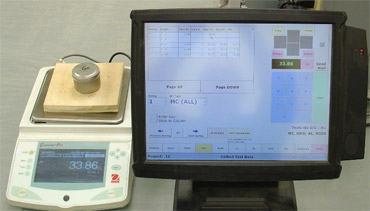
Typical xGEL LabMate™ Pro setup
An electronic data collection form and a weigh-in of a moisture sample. Data from here goes directly to gINT®, BoreDM®, OpenGround®, RSLog® or Excel®. No Pencils—No Typing.
Contact Us Today so that you can tame the data entry monster and free up your life.
Detailed System Requirements
Computer/OS
Desktops/Laptops/All-In-Ones
- Windows XP Pro, and above
- 1TB HDD
- 8 GB min memory
- At least 1 free USB port (for electronic scale)
- 17 inch or larger monitor (regular or touchscreen) 1920 x 1080 resolution
- LAN or Wi-Fi connectivity
- Wireless Mouse and Keyboard
Touch Computers
- TouchDynamic FS100i Pro with Resistive Fujitsu Touchscreen
- 80 GB HDD
- Keyboard Emulation MSR
- 512 MB minimum memory (1GB recommended)
Scale
Ohaus Electronic Scale (Supported Models)
- Adventurer Pro
- Explorer
- Explorer Pro
- Scout
- Scout Pro
- Voyager
- Voyager Pro
Scale Accessories
- Ohaus USB Data Connector Cable
Other Requirements
- Internet Connection
Recommended Options
- Compact laser printer (for printing of lab specimen tracking cards)